A tiny friend beside the notch.
Eavy sits beside the notch as Ghost or Clover the bunny. It taps along while you type, sways to your music, hugs the charger and dozes during Focus. It dresses for the season, too. Turn it on whenever you like.
Eave turns the notch into the most useful spot on your Mac. Try it free for 7 days
Music, volume, files and more, right where you already look. So light you will forget it is running.
Free for 7 days. Then $9.99, once.
Try free for 7 daysIt sits in the middle of your screen and does nothing. Meanwhile you switch apps to skip a song, check the volume, find the file you just saved or see why the fans came on. Every switch pulls you out of what you were doing.
Album art, a progress bar you can drag, and play, pause, skip and back for Apple Music and Spotify. The notch glows in the colour of the song.
Eave moves the volume and brightness pop-ups out of the corner of your screen and into the notch, right where you are already looking. It shows when your AirPods connect, too, and when you plug in, how long until you are full.
A volume slider for every app that is playing sound. Quieten a video without touching your music. While an app is turned down, macOS shows its recording dot; Eave only changes the volume.
Drop files on the notch to keep them close, then drag them out into any app. New screenshots land there too, ready to drag. Drop on AirDrop to share in one move.
CPU, memory and temperature, drawn live while you look and not a moment longer. If your Mac runs hot, the notch tells you.
Eavy sits beside the notch as Ghost or Clover the bunny. It taps along while you type, sways to your music, hugs the charger and dozes during Focus. It dresses for the season, too. Turn it on whenever you like.
A hello the first time you open it, confetti when the battery reaches 100%, and a soft tap on the trackpad as you move between tabs.
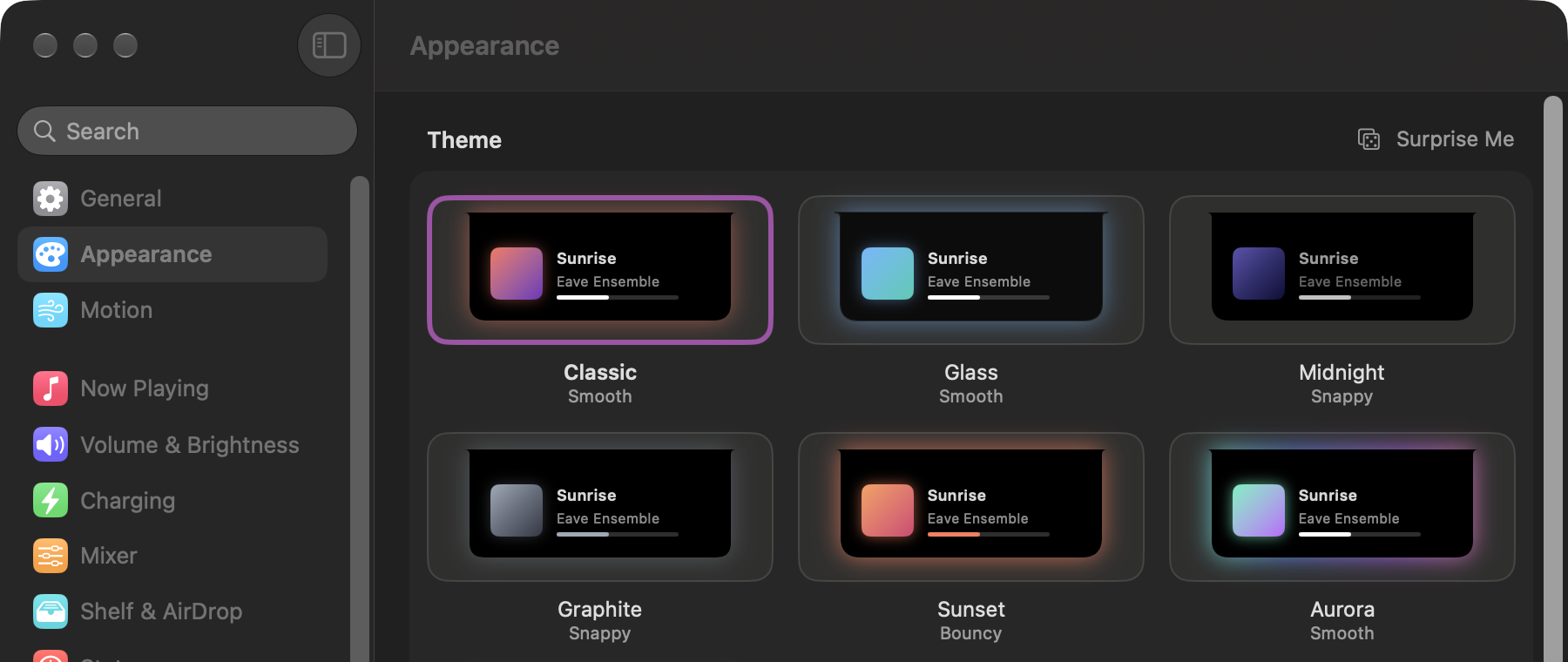
Six themes, each with its own colours and motion, or design your own. Settings look and feel like System Settings, with a switch for every little thing.
People uninstall notch apps for slowing their Mac down. Eave is built the other way round: it waits for macOS to say something changed, and does nothing in between. No timers, no polling.
0.00%
CPU at idle
23 MB
memory at idle
Our ceiling is under 2% CPU and under 70 MB. Eave sits far below it.
| Idle run | CPU | Memory |
|---|---|---|
| Classic theme | 0.00% | 23 MB |
| Glass theme | 0.00% | 23 MB |
| Midnight theme | 0.00% | 23 MB |
| Graphite theme | 0.00% | 23 MB |
| Sunset theme | 0.00% | 23 MB |
| Aurora theme | 0.00% | 23 MB |
| Eavy awake | 0.00% | 23 MB |
It runs only while the Mirror is on screen, and turns off the moment you look away.
Eavy counts key presses, never which keys. During passwords it counts nothing.
There are no accounts, analytics or ads. Eave goes online only to check for updates and your licence.
Yes. On Macs and displays without a notch, Eave draws its own black pill at the top of the screen, and everything works the same.
macOS 26 or later, on a Mac with Apple silicon.
No. With the notch closed Eave measured 0.00% CPU and 23 MB of memory. It never checks things on a timer; it waits for macOS to tell it something changed. Stats only measures while you are looking at it.
Each one turns on one feature, and Eave asks when that feature needs it: Music and Spotify for Now Playing, Accessibility for the volume and brightness keys, System Audio Recording for the Mixer, your screenshot folder for new screenshots when it is Desktop, Documents or Downloads, the camera for the Mirror, and Full Disk Access only for the Focus indicator. The Download page lists every one and why. Skip one and only that feature waits.
Never. The camera runs only while the Mirror tab is on screen. It turns off when you switch tabs, close the notch, lock your Mac or leave it alone for five minutes, and the green light goes out with it.
Yes, both. Music playing in a web browser is not shown yet.
Eave stops until you buy it, and your volume and brightness keys go straight back to macOS, so nothing is left broken. Enter your licence key and everything comes back right away.
No. You pay $9.99 once and it is yours.
Two. One purchase covers two of your Macs.
Automatically, and they are free. Eave checks quietly in the background and lets you know when a new version is ready.
Yes. Within 7 days of buying, no questions asked. Just write to support@geteave.me.
Choose Quit from Eave’s menu bar icon, then drag Eave from Applications to the Bin.

Free for 7 days. Then $9.99, once.
Try free for 7 days